WooCommerce · Image automation

Every product image, perfectly uniform

Stop fixing photos one by one. Australcode Uniform Images resizes, pads and converts every upload to your exact catalog standard — automatically.
Free core on WordPress.org14-day money-back guaranteePart of the Australcode family
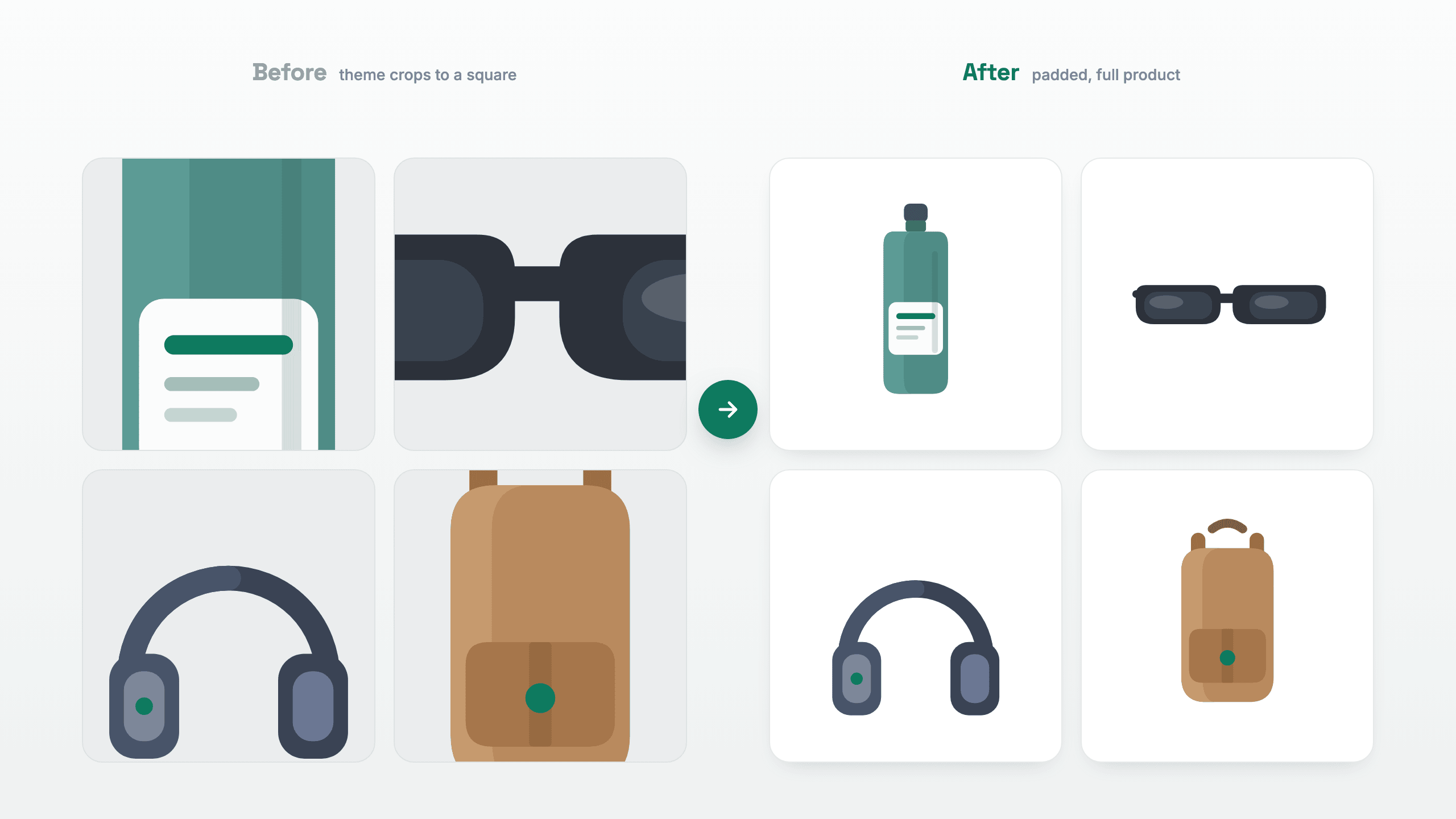
Before and after: WooCommerce product photos cropped and cut off in the grid (left) versus padded onto a uniform canvas so the full product always shows (right)
Actively maintained — public changelogPHP 8.2+ · WordPress 6.5+ · Imagick or GDWorks with any theme & builder (Bricks, Elementor, Gutenberg)100% local processing — no cloud upload, no quotasFree core on WordPress.org · secure checkout by Freemius
What it does

Your catalog, on autopilot

Uniform sizing

One standard for every image

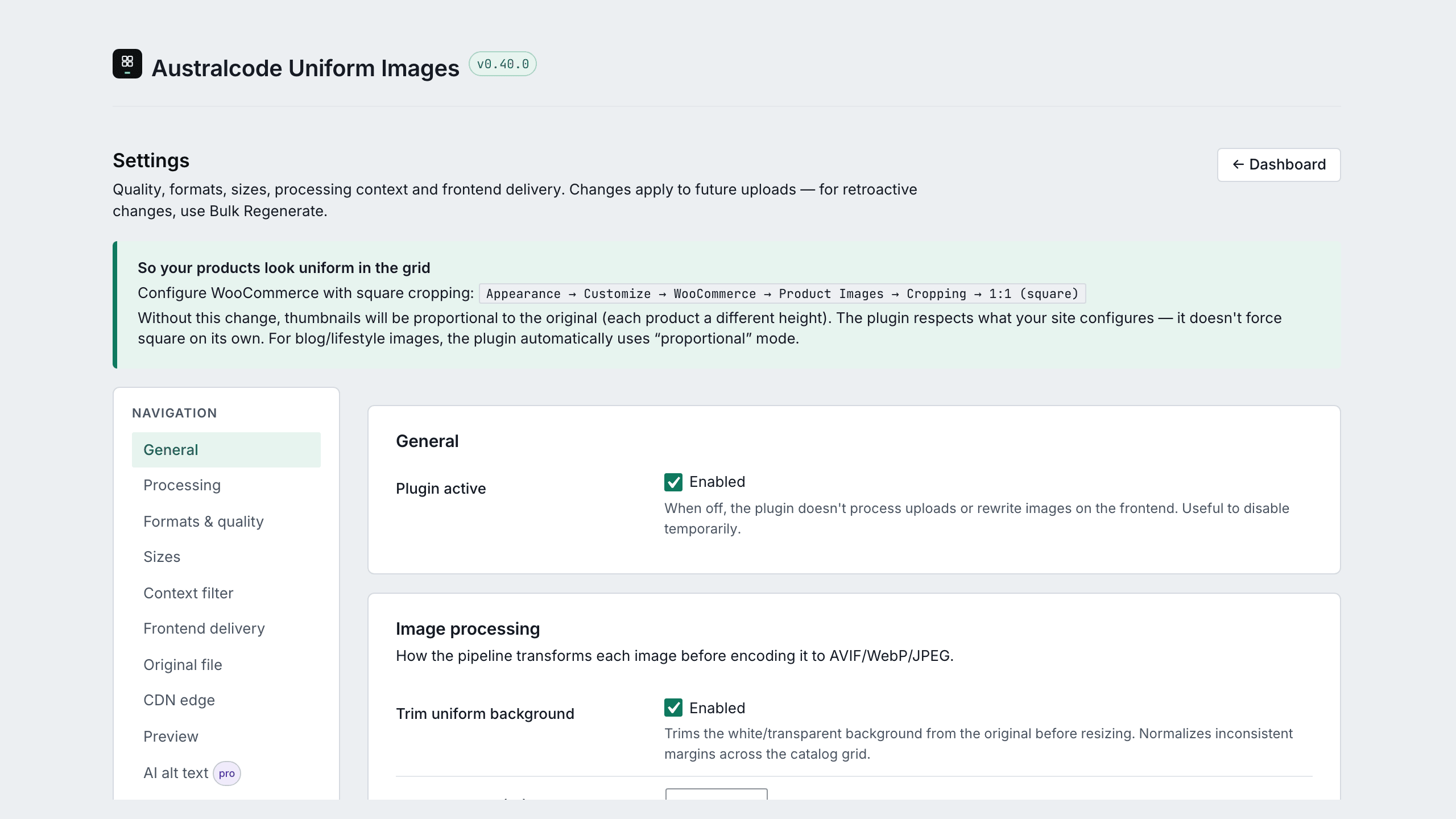
Define your canvas once — 1200×1200, padding, centered. Every new upload comes out identical, padded instead of cropped. Your category pages finally look like a real store.
  • Smart padding — never crops your product
  • Per-aspect-ratio overrides (Pro)
  • Sample tester: preview on a real image before saving
Settings: square-cropping guidance, processing toggles, trim tolerance and canvas controls with inline recommendations
Aspect awareness

Catch the photos that pad badly

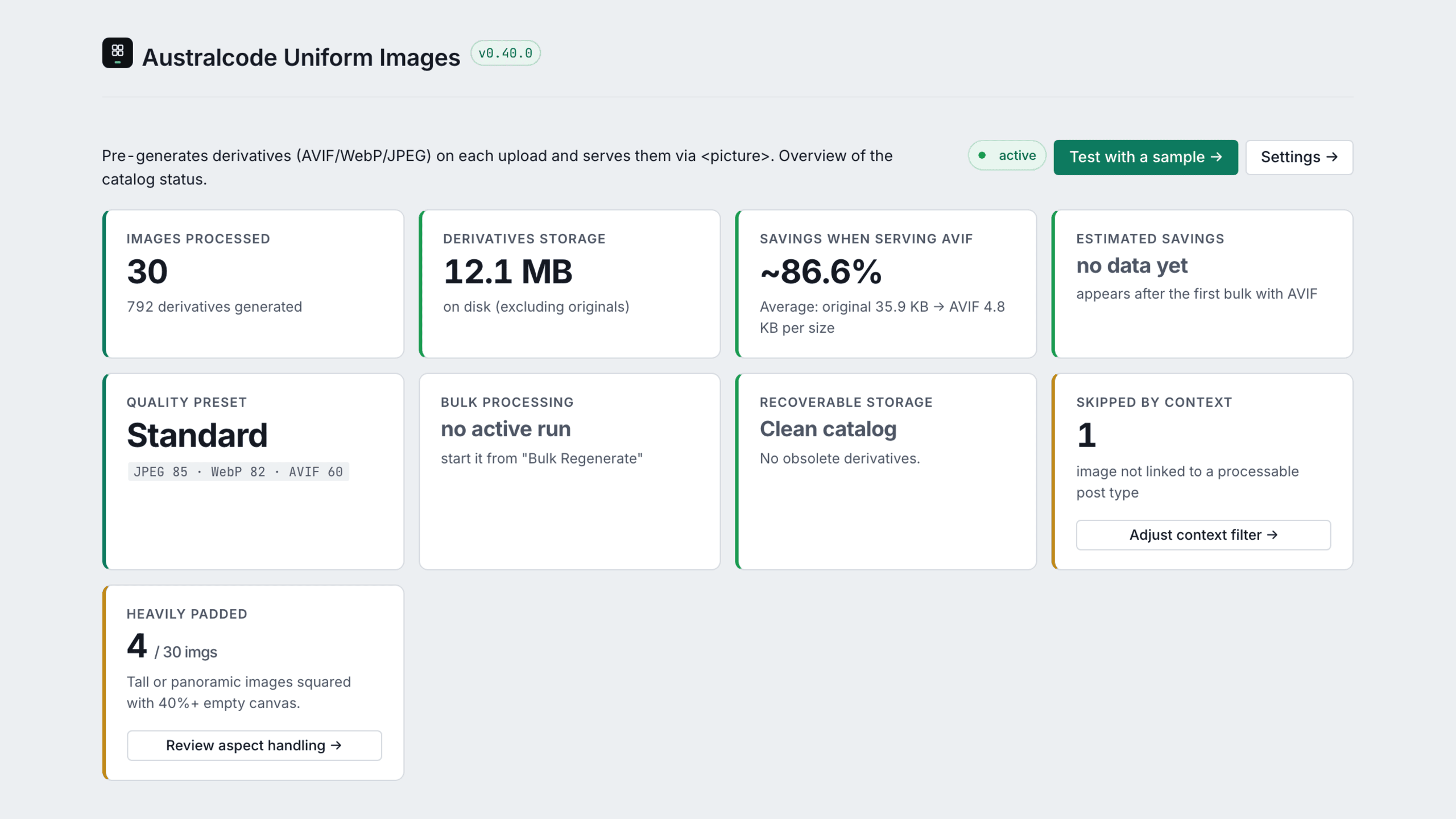
Tall or panoramic shots get squared onto the canvas with a lot of empty space around them. The Dashboard flags those for free — and a gentle, dismissible notice points you to the fix, never forcing a change.
  • Free: the Dashboard counts heavily-padded images
  • Per-aspect-ratio override processes 1:1, 4:3 and 16:9 differently (Pro)
  • Keep square photos proportional while the rest stay uniform
Dashboard: images processed, derivatives, storage and AVIF savings, plus a 'heavily padded' card flagging tall or panoramic photos squared with 40%+ empty canvas
Image SEO

Your filenames are IMG_4832.jpg

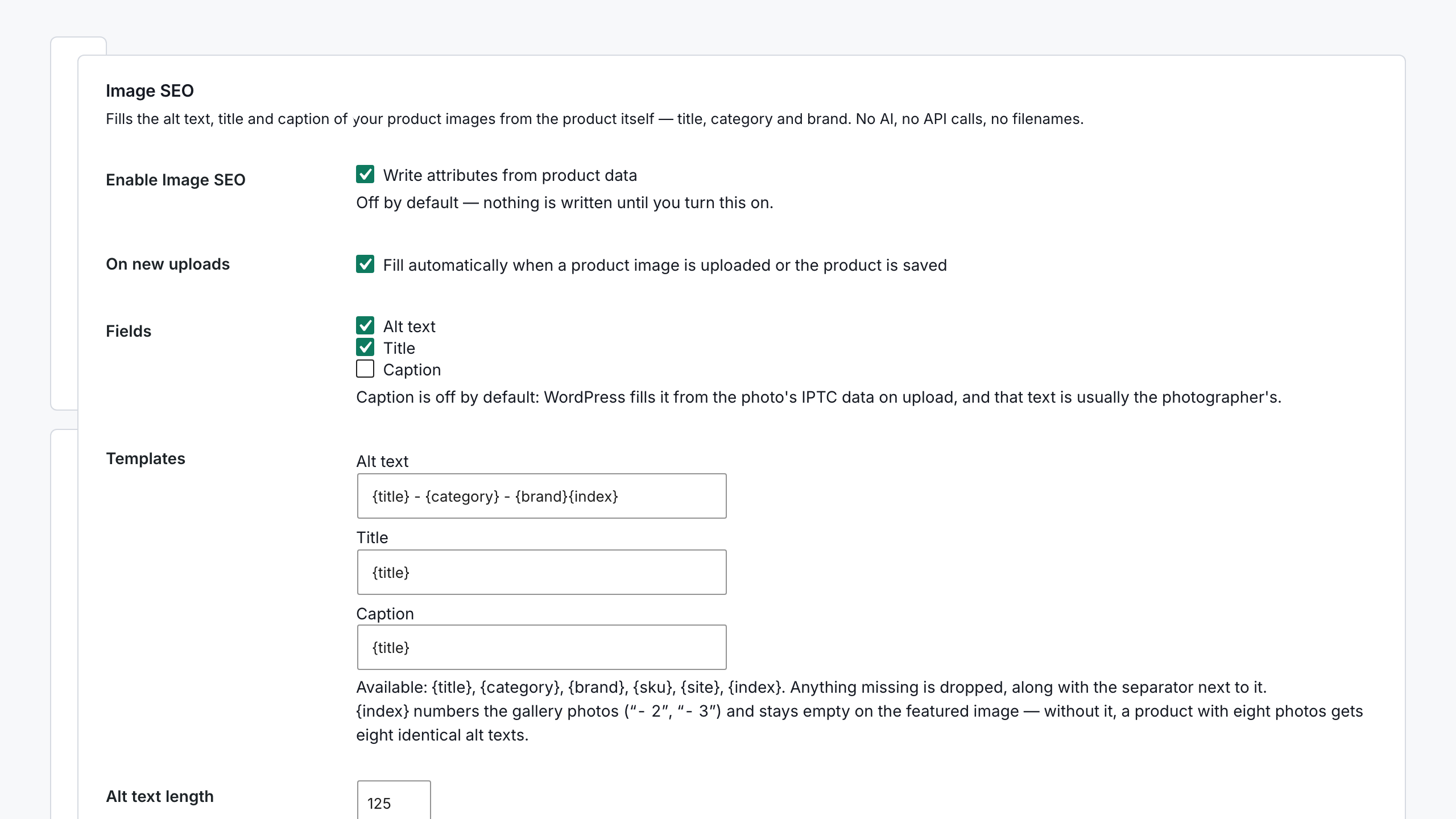
Google reads alt text; your camera doesn't write it. Image SEO builds alt text, title and caption from the WooCommerce product title, category and brand — on every upload, automatically. No AI, no API calls, no per-image cost.
  • Free: every new upload gets real alt text — "Vape Pod XYZ — Pods, Brand Z"
  • Never overwrites alt text you wrote yourself
  • Fill your existing library in one pass (Pro)
Image SEO settings: alt text, title and caption templates built from WooCommerce product title, category and brand, with the bulk backfill Pro card counting how many library images can be filled
Bulk processing

Fix 3,000 old images in one run

The bulk regenerator works through your existing media library — with live progress, error recovery and zero timeouts.
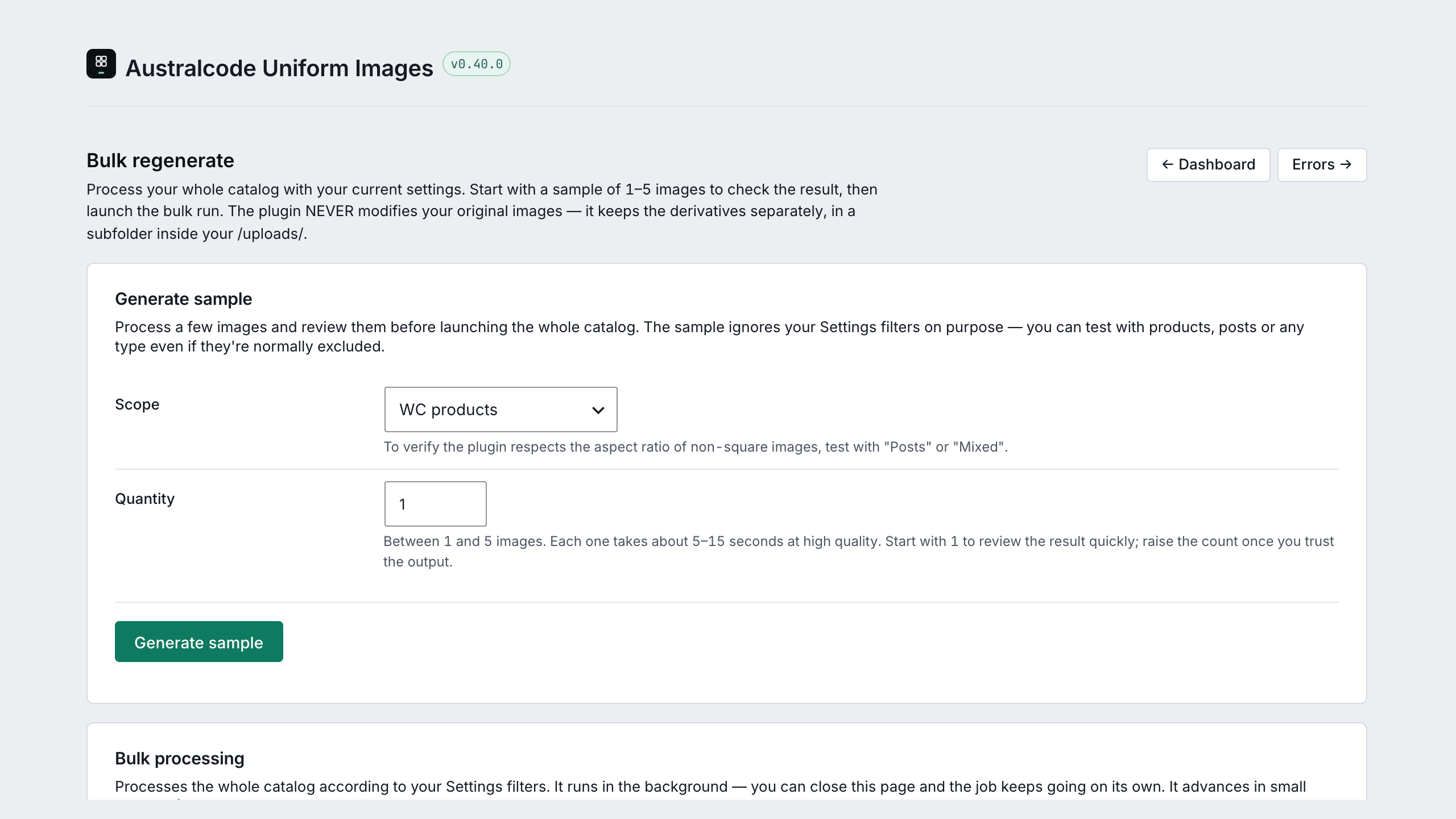
  • Dry-run preview before applying
  • Resumable background bulk with error classification — free
  • 9 WP-CLI commands for big catalogs
Bulk regenerate: sample test, scope with live count and resumable background processing
Modern formats

AVIF & WebP, without thinking

Serve lighter images automatically — processed on your server, no cloud dependencies, no per-image quotas. Faster category pages, better Core Web Vitals.
  • <picture> multi-width srcset, proper type attribute
  • 4-tier quality presets, calibrated per format
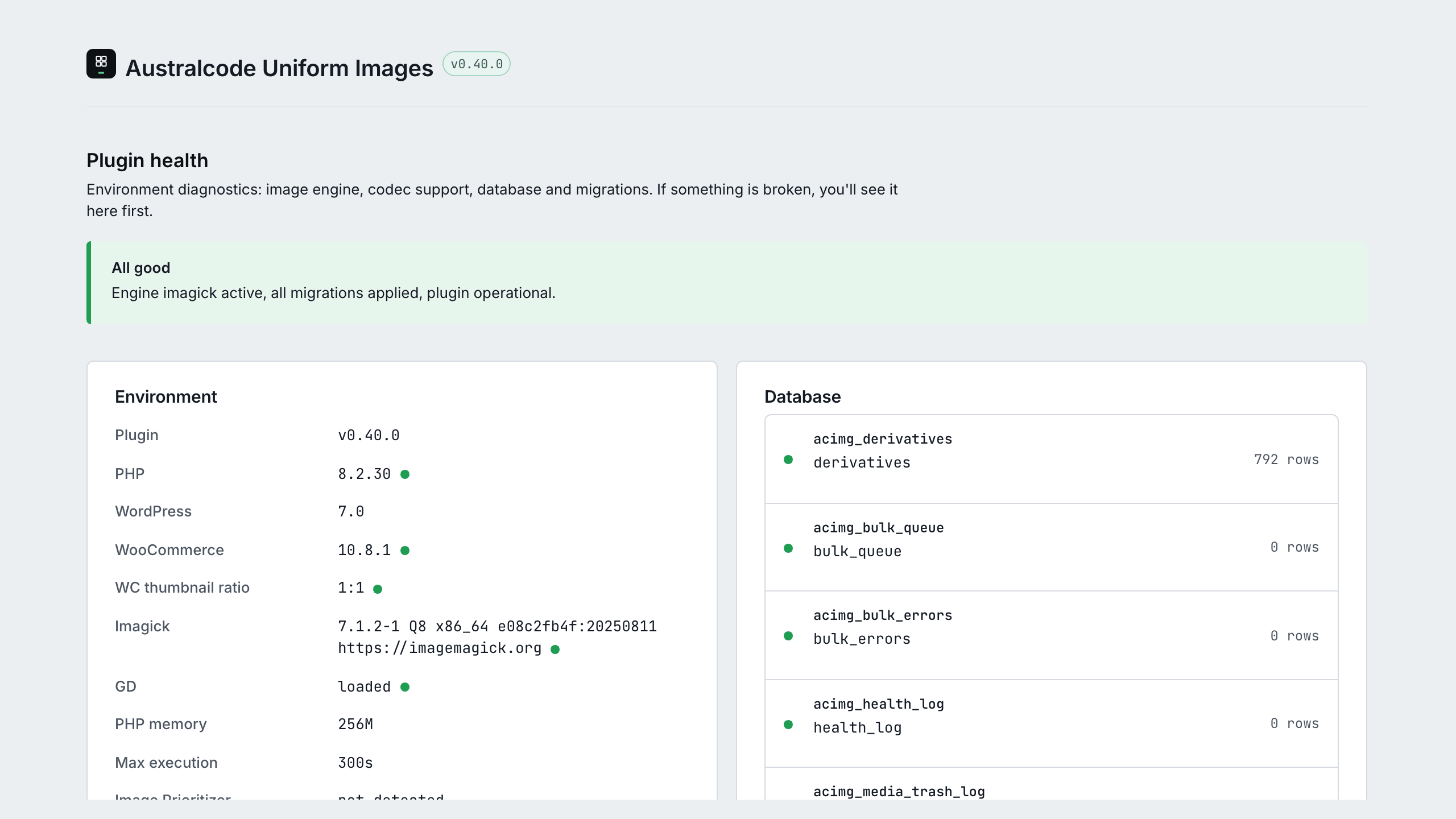
  • Engine health monitor + Cloudflare Polish detection
Plugin health: Imagick engine, codec support, database tables, migrations and CDN edge detection
Everything included

The full toolbox

Every capability shipped today — no roadmap promises in this list except where marked.

<picture> multi-width srcset

Three formats, four widths, proper type attribute. No Vary: Accept — survives any page cache.

Per-size config

Uniform, proportional, or skip per WordPress image size.

Output-format controls

Force JPEG-only or PNG-only output catalogue-wide, plus an optional delivery filesystem check on the Health page.

4-tier quality preset

Maximum, High, Standard, Economy — per-format AVIF/WebP/JPEG quality, calibrated. Standard is half the size, visually identical.

Bulk regenerate

Resumable background regeneration with error classification — free, no image cap.

Sample tester

Preview your settings on a real image before saving anything globally.

WP-CLI included

Seven free commands: health, stats, regenerate, derivatives, purge-cache, restore-originals, migrate-from-sir — plus doctor and reset on Pro.

Extreme-padding detection

The Dashboard flags tall or panoramic images squared with 40%+ empty canvas, with a dismissible notice — a free awareness signal that never forces a change.

Image SEO on upload

Alt text, title and caption built from the WooCommerce product title, category and brand — on every new upload. Deterministic, no AI, no API calls. Never overwrites alt text you wrote yourself.

Missing alt text detection

The Dashboard counts the product images it can actually fill — not the ones merely missing alt — and a dismissible notice points at the fix. Free.

Per-aspect-ratio override

Process 1:1, 4:3, 16:9, vertical and horizontal differently within the same WordPress size — the fix for what the free detection flags. Pro.

Engine fallback

Imagick preferred, GD automatic fallback. Bundled libvips on roadmap.

Theme + page-builder support

Bricks, Elementor, Oxygen, Beaver, Divi via output buffer rewriter (free tier).

AI alt text (BYOK)

Generate alt text per image via OpenAI or Anthropic Vision with your own key — enriched with product title, category and brand. Pro.

Image SEO bulk backfill

Fill the alt text, title and caption your library is missing in one pass, with a dry-run preview. Writes only where the field is empty. Pro.

Catalog Watch + Auto-Heal

Daily cron finds ghost derivatives, orphan files and broken thumbnails — auto-heals with dry-run preview. Pro.

Cloudflare Polish detection

Detects Polish conflicts and warns — admin notice with a re-verify button.

Cloudflare Image Transformations delivery

Serve via your CF zone (format=auto) with automatic availability detection and a cost analyzer. Pro.

Media Library audit + cleanup

Orphan detector that understands Bricks, term meta and WooCommerce shortcodes — trash mode with typed confirmation and audit log. Pro.

Image Health Monitor

Weekly cron scans for missing or stale derivatives and emails a digest only when something needs you. Pro.

Image Prioritizer integration

Honors fetchpriority="high" from the WordPress Performance Lab.

Multi-Site Manager

Monitor up to 25 client sites from one wp-admin (unlimited on the top Agency tier) — aggregated derivatives, bytes and issues. Agency.

Big-image threshold

Override big_image_size_threshold straight from Settings.

HPOS-compatible

WooCommerce High-Performance Order Storage ready, declared from day one.

Setup

Running in 3 minutes

01

Install & activate

From WordPress.org or upload the Pro ZIP. No code, no config files.

02

Set your standard

Pick canvas size, padding and formats. The recommended defaults fit most stores — test them on a real image with the Sample tester.

03

Upload as always

Every new product image comes out uniform. Run Bulk regenerate once for your existing catalog.

1200×1200
or any standard you define
AVIF·WebP
100% local — no cloud, no quotas
9
WP-CLI commands included
0
originals modified by default
Free and paid

Free is genuinely useful. Paid is for scale.

Capability Free (WP.org) Paid (any tier)
Full uniformization pipeline (trim + pad + scale)
AVIF + WebP + JPEG with <picture>
Output-format controls (force JPEG-only / PNG-only)
4-tier quality preset (Maximum / High / Standard / Economy)
Apply trim to original file with automatic backup
Bulk regenerate (background, resumable, error classification)
WP-CLI (7 commands): health, stats, regenerate, derivatives, purge-cache, restore-originals, migrate-from-sir
Theme / page-builder rewriter (Bricks / Elementor / Oxygen / Beaver / Divi)
Per-size config (uniform / proportional / skip)
WP-CLI: doctor (extended diagnostics) + reset + purge-cache --stale / --all
Extreme-padding detection (Dashboard flag + dismissible notice)
Image SEO on upload (alt / title / caption from product data)
Image SEO — fill existing images One at a time Whole library in one pass
Per-aspect-ratio override
Cloudflare CDN delivery Detection only Active delivery
Bunny + imgproxy adapters on roadmap
Media Library audit + cleanup (orphans, trash log)
Image Health Monitor (weekly cron + email digest)
AI Alt Text BYOK (OpenAI / Anthropic Vision)
Catalog Watch + Auto-Heal (daily cron + dry-run preview)
CIT Cost Analyzer (Cloudflare Image Transformations spend)
Multi-Site Manager (central dashboard for client sites) Agency
Priority email support + beta access

The free version is complete for a single store. Paid adds automation, CDN delivery, AI tooling and the multi-site surface that agencies need.

Get the free version
Pricing

Simple plans, honest free tier

Free

For one store getting started
$0forever
  • Image SEO — alt text from your product data
  • Full uniformization pipeline
  • AVIF + WebP, processed locally
  • Bulk regenerate (manual)
  • Per-aspect-ratio overrides
  • Image SEO bulk (whole library)
  • Catalog Watch + auto-heal
  • Multi-Site Manager
Download on WordPress.org
MOST POPULAR

Pro

For serious stores
$49/year · 1 site
  • Everything in Free
  • Image SEO bulk — fill the whole library in one pass
  • Per-aspect-ratio overrides
  • Catalog Watch + auto-heal (daily)
  • AI alt text — bring your own key
  • Cloudflare Image Transformations delivery
  • Priority support
Get Pro

Agency

For agencies & multi-store
$199/year · 25 sites
  • Everything in Pro
  • Multi-Site Manager (25 sites — unlimited on the top tier)
  • Aggregated health across clients
  • Per-tier activation control
  • White-glove onboarding
Get Agency
All plans include:originals untouched by defaultany theme & builderHPOS compatible100% local processingupdates while licensed
🛡️ 14-day money-back guarantee — unconditional, handled by Freemius.
FAQ

Before you ask

Does this replace my existing optimizer (Smush, ShortPixel, Imagify)?
Yes. Australcode Uniform Images handles both uniformization (which they don't do) and format conversion to AVIF + WebP (which they do, but with cloud dependencies and quotas). If you have one of those installed, disable it before activating the plugin. Migrating from Smart Image Resize? Run wp acimg migrate-from-sir to import your settings — free, one command.
Will it work with Bricks Builder / Elementor / Oxygen?
Yes. A dedicated output buffer rewriter (free tier) intercepts the page-builder's rendered HTML and replaces <img> tags with <picture> elements. Tested with Bricks 2.x, Elementor 3.x, Oxygen 4.x, Beaver Builder and Divi.
Does it modify my original product images?
Only if you explicitly enable "Apply trim to original". When enabled, the plugin creates a pristine backup before any modification, and wp acimg restore-originals reverts at any time. Default behaviour: originals untouched, derivatives generated separately.
Is the free version crippled? What's the catch?
The free version is the full uniformization pipeline. No image cap, no daily quota, no nag screens. Pro adds scale features (CDN delivery, Catalog Watch, multi-site, full WP-CLI), not the core promise. We sell to people who need scale, not to people who hit a deliberate limit.
Some of my product photos get squared with big empty borders — can I fix that?
Yes. The Dashboard flags images that get heavily padded — tall or panoramic shots squared onto the canvas with 40%+ empty space — and a gentle, dismissible notice points it out without forcing a change. That detection is free. The fix is the per-aspect-ratio override (Pro): process 1:1, 4:3, 16:9, vertical and horizontal differently within the same WordPress size, so square photos stay proportional while the rest follow your base mode.
Does Image SEO rename my image files?
No. Image SEO writes the alt text, title and caption attributes — it does not touch filenames. Renaming a file after upload means rewriting every URL that already points at it, and getting that wrong breaks live product pages. If file renaming is what you're after, this is not the plugin for it.
What's the difference between Image SEO and the AI alt text feature?
Image SEO reads your WooCommerce product data — title, category, brand — and builds the alt text from a template. It's instant, free, deterministic, and runs on every upload. AI alt text (Pro) looks at the image itself and describes what it sees, using your own OpenAI or Anthropic key at a fraction of a cent per image. Most stores run Image SEO on everything and AI only on the images where the product name doesn't describe the picture. They write the same field, so neither runs automatically on top of the other, and neither overwrites alt text you wrote yourself.
Will it overwrite the alt text I already wrote?
No. The automatic path only writes where the field is empty. The plugin also records what it generated, so if you edit an alt text by hand afterwards it's locked — no automatic pass will touch it again. The only way anything gets overwritten is if you click the button on that specific image yourself, or explicitly pick the "replace existing" option on a bulk run.
Why doesn't it fill alt text on some of my images?
Because they aren't attached to a product. Image SEO builds the text from the product title, category and brand — a logo, a banner or a blog image has no product to read from, so the plugin writes nothing rather than inventing something. The Dashboard counter reflects this: it reports how many images it can actually fill, not how many are missing alt text.
What if I'm already using Cloudflare Polish?
The plugin detects Polish on activation via a probe request and shows an admin warning, because Polish re-encodes the AVIF/WebP it has already generated optimally. Disable Polish for wp-content or accept the double-encoding cost.
What are the quality presets?
Four presets — Maximum, High, Standard, Economy — each setting calibrated per-format quality for AVIF, WebP and JPEG independently. Standard (the default) lands at roughly half the size of the original while staying visually identical for product photography; Economy pushes compression further for bandwidth-sensitive catalogues. Available in the free version.
Is this hosted? Will it upload my images somewhere?
No. 100% local processing. The optional Cloudflare CDN integration uses your Cloudflare zone, not ours.
What PHP and WordPress versions do I need?
PHP 8.2+, WordPress 6.5+. Imagick 3.4.4+ is preferred for AVIF support; GD is a supported fallback for sites where Imagick isn't installed.
How does the AI alt text feature work, and what does it cost?
It is Bring Your Own Key: you paste your own OpenAI or Anthropic API key, and the plugin generates alt text per image via OpenAI Vision (gpt-4o-mini) or Anthropic Vision (claude-haiku-4-5), enriched with the WooCommerce product title, category and brand. We are not a Merchant of Record over AI costs — you pay your provider directly at their rates, which are fractions of a cent per image. Pro feature.
Can I manage multiple client sites from one place?
Yes, on the Agency plan. The Multi-Site Manager is a central dashboard inside one wp-admin that monitors up to 25 client sites (unlimited on the top Agency pricing) — aggregated derivatives, bytes and issues, with automatic hourly sync. It talks wp-admin to wp-admin over native REST using a Bring Your Own Application Password, so no images or data pass through any external service.
Do you support WooCommerce High-Performance Order Storage (HPOS)?
Yes. Compatibility with custom_order_tables and cart_checkout_blocks is declared from day one. No manual configuration required.
What happens if I uninstall?
Originals are untouched. Derivatives can be left in place (no harm) or cleaned via wp acimg purge-cache --all before uninstall.
How do refunds and licensing work?
14-day unconditional money-back guarantee, processed by Freemius — our Merchant of Record. Licenses renew annually (or buy lifetime once); if a license lapses the plugin keeps working, you just stop receiving updates.
Australcode family

More plugins for your store

Back In Stock

Turn sold-out products into recovered sales.

Learn more →

Points & Rewards

Loyalty points that bring customers back.

Learn more →

Product Reviews

Reviews that build trust and convert.

Learn more →

australcode.io

Make your catalog look professional

Free on WordPress.org. Pro from $49/year, with a 14-day unconditional guarantee.

Get Uniform Images Pro